Claude Code has mods now. I used my first one to answer “what's on port 3001?”
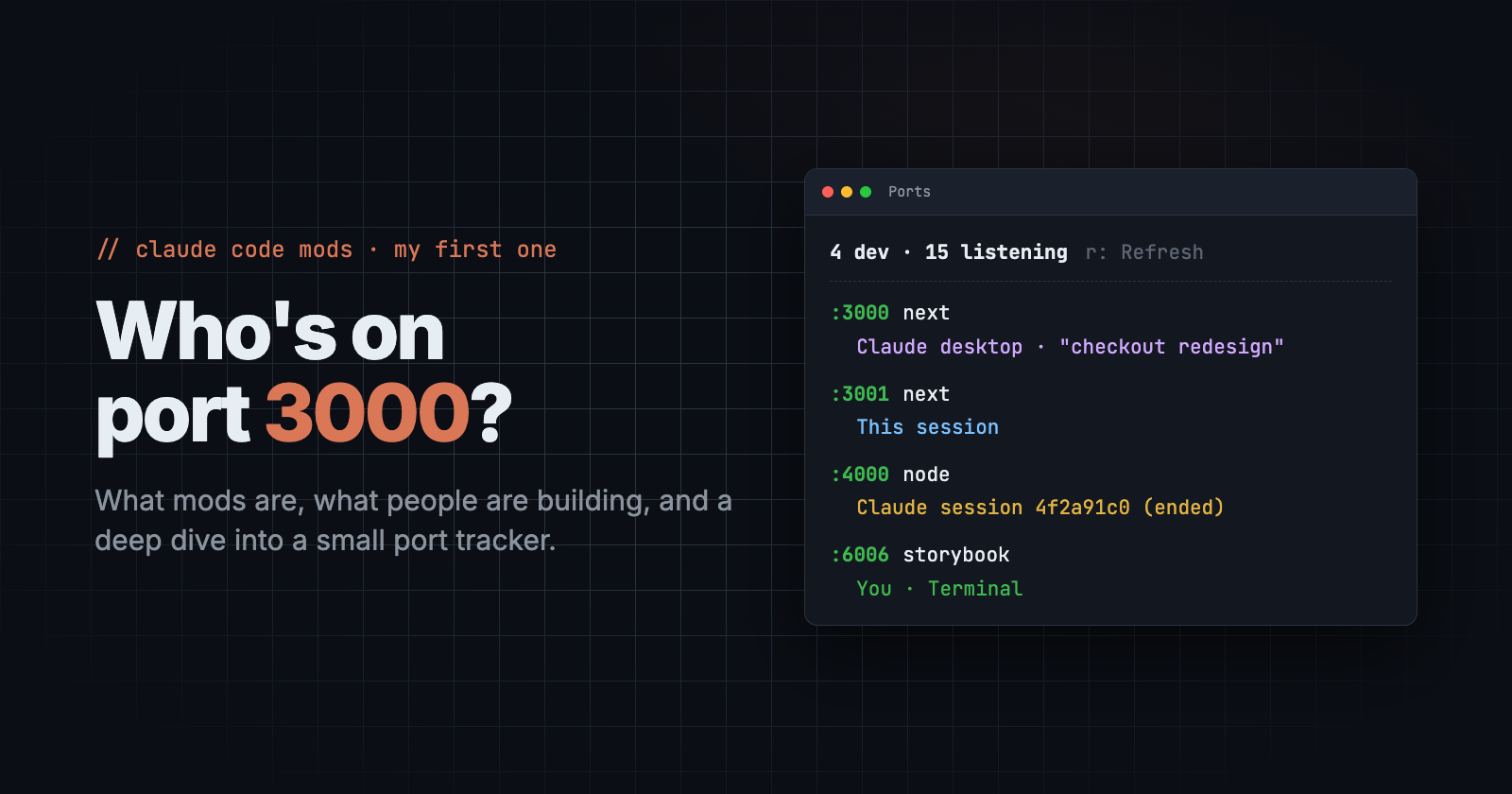
On October 1, Claude Code shipped mods: small TypeScript or JavaScript plugins that run inside your session. They can watch what happens, change what Claude Code does, and draw their own UI in the terminal or the desktop app.
I read the announcement, thought "neat", and realised if I can make use of this mods to address a situation I often find myself where I don't know if my same app is running on multiple ports, what are the source and owner.
⚠ Port 3000 is in use, trying 3001 instead.
And I asked myself the question I always ask: who is on 3000?
This post covers both: what mods are and why I think they matter, and the small mod I built for that question. It goes into the implementation, because the interesting parts were in the details.
The problem: ports with no owner
On a normal day I have multiple projects open, each with two or three git worktrees: one per ticket, so branches don't step on each other. On top of that:
I start my own dev servers in a terminal.
Claude Code sessions start Storybook or
next devin the background while they work.The Claude desktop app runs preview servers for its own sessions.
Next.js and Storybook quietly move to the next free port when theirs is taken.
So by mid-afternoon :3000, :3001, :6006 and :6007 are all taken, and I can't tell which belongs to which worktree, which session, or whether the session that started it is still running. The usual fix was lsof -i :3000, a PID, ps, a guess, and sometimes killing the wrong thing.
It's a small problem, which is why I'd never fixed it.
So what is a mod?
A mod is a plugin made of function hooks. You register functions against events inside Claude Code, and each one gets three things:
on('tool.call', { tool: 'Bash' }, async ($, e, next) => {
  // $    → the engine: UI, processes, files, state, clock, model…
  // e    → the event: here, the Bash command about to run
  // next → let it continue (optionally with a rewritten e)
  if (/git push.*origin (main|develop)/.test(e.command)) {
    return { deny: 'Push to a shared branch? Open a PR instead.' }
  }
  return next(e)
})
That next is the key idea. A hook can sit before something (block it or rewrite it), after it (read the result and react), or instead of it (answer by itself). Hooks exist for tool calls, prompt submits, the system prompt, turn start and end, session start, and rendering.
And mods can draw:
| Surface | Use it for |
|---|---|
| Pane | A panel beside the transcript: dashboards, lists, controls |
| Band above the prompt | Live, glanceable state |
| Status line entry | One line, always visible |
| Toast | A short notice |
| Slash command | /your-thing that opens or runs something |
Some properties that make this more than a novelty:
Hooks change behaviour, not just advice. A CLAUDE.md rule asks the model to behave. A hook enforces it, because it runs in the harness and not in the model's head.
Most mods cost zero tokens. Unless your mod calls the model on purpose, it's just local code. Mine runs
netstatandps, nothing else.They hot-reload. Claude writes the files, the session reloads them at the end of the turn, and you see the change right away.
They're yours. You can shape the tool around your workflow instead of waiting for a feature that fits everyone.
One honest caveat, which Anthropic states clearly: a mod is code running with the same access Claude Code has. Install mods the way you'd install a package: read them first, and only from people you trust.
Wait, doesn't Claude Code already have hooks?
It does, and the naming is confusing at first, so here's how I think about it.
Hooks (the ones in settings.json) are shell commands that run at fixed moments: before a tool runs (PreToolUse), after it (PostToolUse), when Claude stops, when a session starts. Claude Code starts your script, passes the event as JSON on stdin, and reads back an exit code or a small JSON answer: allow, block, or add some context. They're great for simple rules: run Prettier after every edit, block rm -rf, send a notification when a task finishes.
Mods are built on function hooks: TypeScript functions that run inside Claude Code instead of as separate processes. That changes what's possible:
| Hooks (settings) | Mods (function hooks) | |
|---|---|---|
| What you write | A shell command or script | A TypeScript/JS module |
| Where it runs | A new process per event | Inside the session |
| What it can do | Allow, block, add context | Rewrite inputs, change results, answer instead of the engine |
| UI | None (text output only) | Panes, a band above the prompt, status line, toasts, slash commands |
| State | You manage files yourself | Built-in session and persistent state that redraws the UI |
| Events | A fixed set of lifecycle points | Tool calls, prompts, system prompt, turns, rendering… (and the classic hook events too) |
| Dev loop | Edit, then restart | Hot-reloads in the running session |
The idea that ties a mod together is next(e). Every hook gets the event and a next function: call it to let things continue, call it with a changed event to rewrite what happens, or skip it and answer yourself. Hooks react at checkpoints. Mods sit in the pipeline.
Which one should you use? If your rule fits in one line of shell, use a hook. It's simple and needs no build step. If you want to see something (like my /ports pane), keep state, or change what flows through Claude Code, that's a mod.
What people are building
The examples from the first week are a good mix of useful and fun:
Token Weather (from Anthropic's launch post): a band forecasting context-window usage, with trend icons.
Blast Radius (also Anthropic): catches risky Bash commands such as
rm -rforgit reset --hardand shows what would be affected before they run.Replay Theater (Anthropic): steps through the file edits a turn made.
burn-meter: live spend against plan limits.
launch-codes: risky commands need a one-time code.
boss-fight: a pixel boss spawns from failing tests and takes damage as they pass. Yes, really.
inbox-alerts: Gmail, Slack and Calendar notifications as toasts and a pane.
cockpit: a tabbed side pane next to the transcript.
The pattern I see: guards (stop the bad thing), gauges (show hidden state), and workflow glue (the step you always do by hand).
Finding my use case: I asked Claude to audit me
Before writing anything I tried something I'd recommend: I asked Claude Code to read my last 30 sessions and find patterns: things I ask for repeatedly, things I check by hand, steps I always do before or after a task.
Some of what came back was a little embarrassing:
git status/git diffrun ~140 times across 30 sessionsnvm use 22prefixed 44 times"update snapshots" asked for by hand, and run from the wrong folder twice
several "I don't see it in the worktree" moments
It suggested five mods: a shared-branch guard, a checks band, a changed-files pane, and so on. Ports weren't top of its list. But ports were the one that annoyed me that day, so that's where I started.
Building /ports: the deep dive
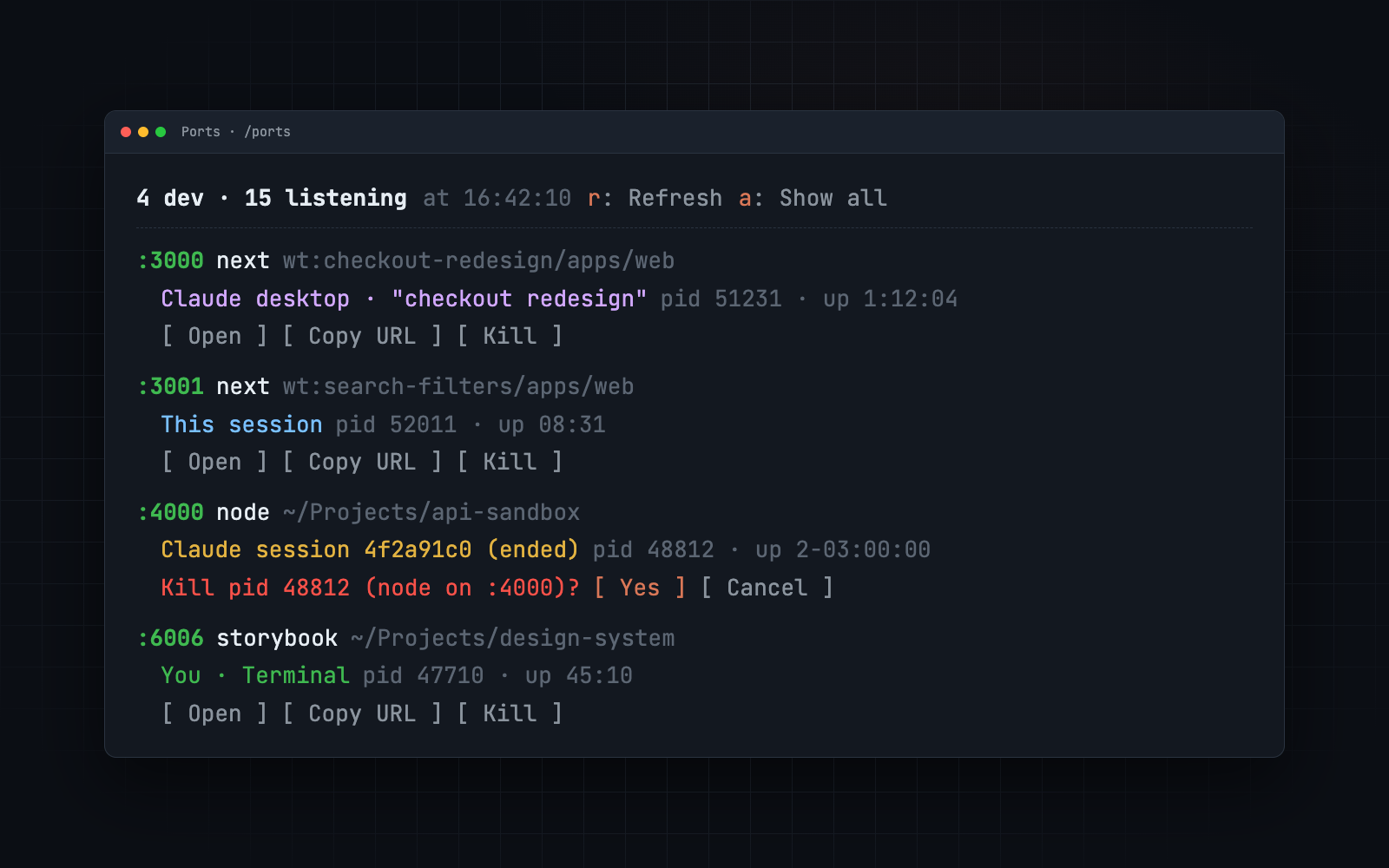
The goal: type /ports, get a pane that lists every listening port, says who owns it (my terminal, a specific Claude session, the desktop app, or a session that has since ended), and lets me open, copy or kill it safely.
A mod is three files:
ports/
├── .claude-plugin/plugin.json   # name, version, description
├── hooks/hooks.json             # { "modules": ["./register.tsx"] }
└── hooks/register.tsx           # export const register: Register = (on) => { … }
Mine ended up with two more: hooks/scan.ts (pure parsing, easy to test) and types/index.d.ts, which declares the state the pane reads.
Step 1: Find the listeners (and the lsof surprise)
My first instinct was lsof -iTCP -sTCP:LISTEN. On my Mac it hung, even for a single PID. (Probably a stale network mount; lsof walks more than it needs to.)
The fix was older and faster. On macOS, netstat -anv includes a process:pid column:
tcp4 0 0 127.0.0.1.3000 *.* LISTEN … node:5001 …
It runs in about 15 ms. One regex turns each line into { port, address, pid, name }, and v4/v6 sockets of the same server collapse into one row.
Step 2: Who owns it? Walk up the process tree
ps -axo pid,ppid,etime,command gives the whole process table. From each listener I walk up the parent chain until I recognise something:
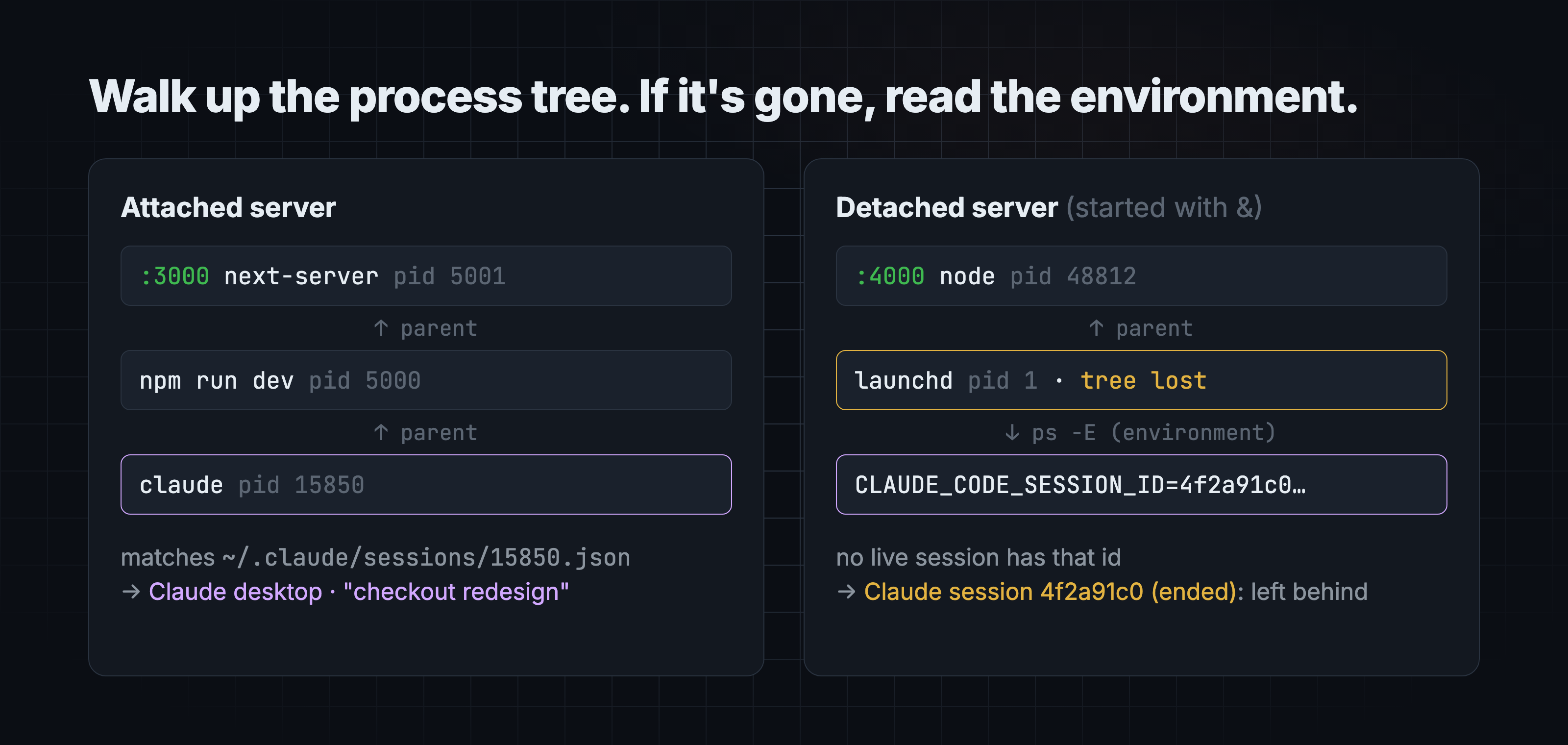
Claude Code writes a small file per running session to ~/.claude/sessions/<pid>.json, with the session ID, working directory, name and whether it came from the CLI or the desktop app. So if any ancestor PID matches one of those files, I know exactly which session started the server. If I hit Terminal.app, iTerm or Warp instead, it was me. Claude.app means a desktop preview. Cursor.app means the editor.
Step 3: The detached-server problem
The first live test failed in an interesting way. I started a server the way agents often do, detached in the background:
(node server.js &)
The pane said "system / launchd". When a process is detached, its parent exits and macOS re-parents it to PID 1. The family tree is gone.
The fix was in the environment. Claude Code passes its session ID to every child process as CLAUDE_CODE_SESSION_ID, and environment variables survive re-parenting. ps -E prints a process's environment, so:
// ps -E -ww -o pid=,command= -p <listener pids>
const pwd     = /(?:^|\s)PWD=(\/\S*)/.exec(line)
const session = /(?:^|\s)CLAUDE_CODE_SESSION_ID=([0-9a-f-]{8,})/.exec(line)
That gave me two things at once:
Which session owns a detached server, even after it's been re-parented.
Which folder it started in (
PWD), so the pane showswt:checkout-redesign/apps/weband I know the worktree at a glance.
It also gave me a new category I hadn't planned for: if the session ID isn't in the live sessions list, the session has ended. Those rows show as Claude session 4f2a91c0 (ended): servers left running by a session that no longer exists. In practice, that's most of what I want to kill.
A note on care: the environment also holds things like tokens. The parser keeps only PWD and the session ID and drops the rest.
Step 4: State and the pane
Values a drawing reads live in host-owned state (they survive hot reloads), declared in a small contract:
declare module 'claude-code' {
  interface PluginState {
    ports: {
      rows: PortRow[]
      showAll: boolean
      pendingKill: PendingKill | null
      message: string
      scannedAt: number
      isOpen: boolean
    }
  }
}
The pane is a ui.render hook. Reading an atom subscribes the drawing, and writing it redraws only what reads it:
on('ui.render', { component: 'Pane', requestId: 'ports' }, async ($, e) => {
  const { Box, Text, Button } = $.ui.resolve(e)
  const all = await read($, rows)
  // … one block per port: ":3000 next  wt:checkout-redesign…", owner, pid, uptime,
  //   and [Open] [Copy URL] [Kill]
})
A $.clock.every(5000, …) timer rescans while the pane is open and stops when it closes.
Step 5: Killing safely
Killing a process is the one place this tool can do damage, so:
Kill asks first:
Kill pid 5001 (next on :3000)? [Yes] [Cancel]It sends
SIGTERM, waits 1.5 s and rescans. If the port is still held, it offers Force kill (SIGKILL) as a separate step.Claude session processes have no Kill button. You can't close a session from this pane by accident.
Step 6: The validator taught me a rule
claude plugin validate checks the module the way the engine will load it. My first version failed:
$ is passed to "startTimer", which is not a function declared at the top of this file…
Helpers that take the engine handle $ have to be top-level functions, so the validator can trace which capabilities the mod uses. I moved them up and it passed. It then lists exactly what the mod touches: $.process.run, $.clock.every, $.ui.open, state keys, env reads. That list is a nice audit for anyone installing it.
Tests: the parser is pure functions, so it's tested against fixture netstat/ps output covering a Claude desktop session, a Terminal-started Storybook, a detached server from an ended session, and a system daemon. I also wrote a UI test that mounts the pane on the terminal and desktop surfaces and checks that Kill never fires without the confirm. The mod test runner was switched off on my machine that day, so that one is still waiting to run.
What I took away
Mods move the line between "I wish the tool did X" and "the tool does X." That line used to be a feature request. Now it's an afternoon.
Start from friction you can measure. Asking Claude to audit my own sessions was the most useful step, and it's reusable.
Small, boring tools are the best first mod. No model calls, no tokens, one clear job.
It's early. The API moves between releases, and mod UI doesn't draw in the VS Code extension yet (#99423). Fine for personal tooling; plan for change.
Next on my list from that audit: a guard that refuses pushes to shared branches (I've been bitten), and a band showing tsc/jest/eslint status per worktree.
Want to build one?
I'm not publishing this one as a package. It's tuned to my setup, and I'd rather you build the version that fits yours. But I'm happy to share the workflow I used: the audit prompt, the order I went in, and the gotchas above, so you can go from idea to a working mod in one sitting.
If that's useful, leave a comment or message me and I'll send it over.
References: Getting started with Claude Code mods (claude.dev) · Claude Code docs · Claude Code Mods Explained, with 10 open-source examples


